

Enhanced Feeds liven up your feed

Blogs have a powerful feature called in RSS feeds that enables people to read and keep track of their favourite blogs easily in aggregators like Bloglines and Google Reader. RSS readers of your blog never have to wonder if it has been updated because their news reader will tell them within an hour or two whenever you make a post.
Up until now your feed has been fairly basic. All you got in most aggregators was the post title and the content. Simple to navigate and read, but it left you with so many questions. How do I add this post to del.icio.us? How do I Digg it and has it been Dugg already? I wonder how many comments have been left?
Wonder no longer. Today, your WordPress.com feed can be supercharged with the following fine feed widgets:
- Comment Count
- Categories
- Tags
- “Add to Del.icio.us” link
- “Digg it!” link
- “Stumble it!” link
Comment Count is turned on by default but you can switch all the features on or off as you please. This is what your blog will look like in a news reader with everything turned on.

To activate these goodies, go into the “Reading Options” page (Options->Reading) of your blog and scroll down. You’ll see the following checkboxes where they can be switched on or off.
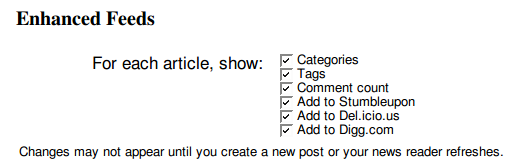
If you have any ideas for other feed bling we could add, let us know in the comments.
- December 18, 2007
- Features, New Features
 WordPress.com News
Woot! Thanks!
LikeLike
I hope this helps with my traffic. Ive only had two people see my new blog so far. Im still learning everything.
LikeLike
Killer good!
FeedBurner get a’runnin’!
Do you have plans to automatically push WordPress AdSense or other advertising on our feeds? If so, will we have the ability to turn it off or opt out?
LikeLike
David, no plans to advertise in feeds currently.
LikeLike
Very nice additions! Thank you.
LikeLike
Wow! Looks like the features just keep coming. Keep up the great work guys!
LikeLike
Great additions!
Glad to see so many updates being posted lately.
Thanks for the great work you’re all doing!
LikeLike
thi is totally awesome…
LikeLike
Now I can keep track of my reader. I call him “George.”
I made him up.
LikeLike
Hi there and thanks for adding this wonderful option.
However, when I added the checkmarks by all the options in this feature and pressed the “update” button, the check marks disappeared. The “comment count” remained, but the others did not take and I tried a couple of times.
Can someone assist me with this problem?
Thanks again.
LikeLike
masterclasslady, I just tried it on your blog and it seems to have worked fine. Could you maybe try it again?
LikeLike
Checking this out now.
LikeLike
pwn. this is a great addition
LikeLike
Even though I know nothing I write will be dug, I am very happy with these additions. ^^
LikeLike
cool !!
LikeLike
I had been expecting this “Add to del.icio.us” for such a long time! and the rest is pleasant too. Thanks a lot.
LikeLike
Good work, but I don’t think you have all the bugs out yet. When I try to check additional boxes and click “save,” the boxes all come unchecked.
LikeLike
Dave Bonta, I don’t see your WP blog, but updating the options is working well in every place we can test it. Try contacting support if you still have trouble.
LikeLike
cool. now all i need is some people to start reading my feed!
LikeLike
Thanks for that reassurance, Matt! That’s helpful information.
Do you happen to know what happens if we re-burn our now-enhanced RSS with FeedBurner and their promo links that seem to provide similar service to your new links? Will we get double links to Digg and the like or will FeedBurner strip out the extra WP.com adds?
LikeLike
David, I imagine you’d have two of the same thing. You should probably pick the widgets from one or the other.
LikeLike
Cool!
LikeLike
Sweet!!
LikeLike
This is wonderful news! I wish I knew what it all meant.
LikeLike
Fantastic! Thanks and Merry Christmas!
LikeLike
nice!
LikeLike
Does this mean that we are going to get the Feed Stats back???
LikeLike
Very cool! Ty WP! *Goes to activate all of them now*
LikeLike
Fantastic! Thank you for adding these bonus features! I just checked off all six goodies. Look forward to seeing them in action after I add a new post later today.
LikeLike
great news
LikeLike
Brilliant guys, this will really help us to make maximum use of feeds. You guys are fabulous!
LikeLike
Matt, I am also having a similiar experience. After checking each of the boxes and doing the update, none of the options remain checked…like my checking the boxes ever happened. What’s up?
Seems like this has been happening to alot of people from the comments above. There may be a bug ???
Thanks for checking on this matter.
Craig
LikeLike
Thank you 🙂
LikeLike
thank you so very much! This is great!
LikeLike
vowwwwwwwwww lets rock !!!!!!!!!!
LikeLike
another option would be e-mail this, it is there by default in Google Reader, but I do not know about other aggregators …
and add reddit too, along with digg.. 🙂
LikeLike
You rock!!!
LikeLike
Really cool …. wanted this feature for sometime now ….. tnx.
LikeLike
BTW, how about having the same but not only for RSS readers, but underneath usual posts, too.
LikeLike
I like this 12 days of Christmas thing! Thanks!
LikeLike
Hi Matt,
Love the platform.. Thanks!
LikeLike
Thanks WordPress! Nice extra just in time for Xmas!
LikeLike
WOW!! That’s kick ass!! 😀
Love WP!
LikeLike
@David W. Boles Yes, we’re having same links from both feedburner and wordpress.com feed.
@Matt I noticed that now inside the rss there’s the stat count emoticon too. Are you going to reactivate stats too? 😛
LikeLike
Great Addition!
When will it be debugged and available for use?
LikeLike
Awesome additions. WP only keeps getting better.
LikeLike
😮 Cool!
LikeLike
This is fabulous, thank you very much. Cheers and Happy holidays to all!
LikeLike
Maybe a trackback count as well?
This is shiny.
LikeLike
this is great! i like it very much. thanks!
LikeLike
nice but this don’t work for me. I switch on all checkboxes and update option but … nothing … no change
LikeLike
Excellent, but, there’s always a but, how about feed stats.? Now that would be nice.
LikeLike
Ok, now that seriously rocks. So much for FeedBurner!
LikeLike
Was waiting for this. But like so many others, I am unable to turn on the feature. The boxes get unchecked the moment I check them and update.
LikeLike
OH MY GOD! ITS VERY GOOD THANK YOU mr.
LikeLike
How about a “reddit” button?
LikeLike
Very good.
Thanks
LikeLike
I used the above, thank you very much. I too tho hit ‘update’ and all the checkmarks disappeared except the ‘comment count’. It says my options were saved, but were they?
Thanks
LikeLike
Matt,
I am facing the same problem as the one faced by masterclasslady and Dave Bonta. Any suggestions will be of great help.
LikeLike
Awesome \m/
LikeLike
nice nice man
LikeLike
Sweet! As far as additions, maybe integrating or splicing other feeds into our WP feeds (e.g. twitter, flickr, del.icio.us) may be cool.
LikeLike
Great work! But a suggestion: maybe a user selected cut-off for RSS-posts? I know you have the “read more” tag, but maybe something like that that only effects the feeds? Because my blog is imported on the Dutch equivalent of facebook, but it won’t load youtube embeds, and it screws up the layout of my posts (the imported ones). So I would like to have a small bit of description imported, but not the rest! I know the “show summary” option, but it doesn’t display a “click here to read the rest” link, so I get akward situations because it might exactly cut off the main image, or something…
LikeLike
Cool!
LikeLike
It would be nice if we could provide a “footer” template for each entry. That way we can drop in our own social bookmarking, etc, code and have it automatically be added with the appropriate title, etc. Right now I have to use AutoHotKey and manually enter the page address and title each time to generate the social bookmarking code for each entry.
LikeLike
Feedburner currently tracks syndication and other RSS stats, does WordPress.com offer such stats or plan to? Thanks for the new features, they are appreciated.
LikeLike
Great enhancements! Is it possible it have these on the actual blost articles too?
LikeLike
I posted about this yesterday, saying that there will no doubt be requests for further social bookmarking services besides the initial three, and that my preference would be for reddit. This morning, reddit does indeed seem to have been added. Thank you!
LikeLike
Thats cool. give me social bookmark buttons on posts please.
LikeLike
Great work and thanks for the enhancement of feeds. I love this work and hope i’ll will enjoy!
LikeLike
MANY THANKS! 🙂
LikeLike
Anything to liven up my feeding. Anything.
LikeLike
Fantastic!!! Thanks so much!
LikeLike
hello mr. wordpress add balatarin site for iranin and persian language. ok
http://balatarin.com is digg iranian
LikeLike
Excellent addition! Thanks a lot.
LikeLike
Matt, you guys rock!
Wonder if there’s any discussion about the “font” used for the Posted in… Comments… Add to… bits?
I’ve looked at it in Safari, Google Reader (via Mac browsers) and the font used is blehhhkk 😛
How about Verdana or Trebuchet or (gosh forbid Arial)? Not sure what’s in use but it’s icky.
All the same… Thanks for the helpful tool for traffic gen. Will get to work later tonight and hopefully Twitter the immediate infusion of new commenters.
Gerald in Tulsa
LikeLike
Woot, indeed!
LikeLike
Wow, thank you this is fantastic!
LikeLike
This is exactly what I have wanted for months! Thank you!
LikeLike
Love it! Thanks WordPress!
LikeLike
its working today hooray !
LikeLike
word.
LikeLike
I would like to see a section where you can add static text that sits as a prefix, or a suffix, to all outgoing feeds, but doesn’t appear in the article. I want to encourage readers of my feed to replace the feed from an old site with the new one.
LikeLike
Very good, people. Really nice job.
LikeLike
Finally I wanted this for so long! Now we got it! Already activated. Maybe in near future you can add the “add to del.icius” and some more widgets for Home page. Thanks
LikeLike
Very cool addition indeed but I have some problems too. At first, like masterclasslady and Dave Bonta, I experienced the “unchecked boxes” problem. When I managed to work around it after a few tries and succeded, then nothing new happened on my feeds. I mean, my new posts’ feed appear as before, without the enhancements. Anyway, I’m sure it’ll be fine soon.
LikeLike
LikeLike
thanks a lot WP.
LikeLike
It’s working now, the options could be saved.
LikeLike
I’ve had a similar experience as masterclasslady; yesterday I checked everything except ‘categories’ but when I checked it a moment ago, the only thing that was checked was ‘comment count.’ Trying again; hopefully this time it will take.
Oh yeah, one more thing… can you add an enhanced feed option that will make people respond to my words of wisdom? *LOL*
LikeLike
Are the feeds to tags covering only the posts on my blog or all posts within WordPress.com with that tag?
And will these work in EVERY WordPress.com Theme?
LikeLike
Thanks
LikeLike
Great addition. Will these widgets come up if I edit a previously published post?
LikeLike
Awesome. Now if we could only get “add to delicious” or “digg this” links automatically embedded in our actual posts, that would be even better. Currently, we have to enter such links manually.
LikeLike
Another feed idea, is giving us a feed count chicklet, like what Feedburner uses. If we could display how many readers we have, then many of us wouldn’t have any reason to burn our feed with feedburner.
LikeLike